
Christina Evangelin Ebinezer
Marketing Associate



As field operations get more complex and sales teams lean harder on tech, the need for systems that are not just secure but also easy to use and adaptable is more important than ever. That’s where Sales Force Automation (SFA) continues to play a key role. But even small hiccups—if left alone—can quietly slow things down in a big way.
With our latest update, SFA 7.18, we’ve focused on fixing a few pain points that have been popping up out in the field. Things like duplicate mobile numbers, patchy training resources, weak login security, and rigid forms have all been addressed. Every new feature in this release was built to solve a real problem—making SFA smarter, safer, and more flexible for the people using it day to day, whether that’s delivery reps, merchandisers, or managers.
If you’re someone who oversees field operations, ensures compliance, or makes decisions based on frontline data, SFA 7.18 brings updates that should make a real difference.
Here’s what’s new:
Let’s explore these updates in detail.
Creating a new outlet used to be easy. Maybe a little too easy. There were no real checks in place to stop field sales team from using the same mobile number across multiple outlets. Since mobile numbers are often used as unique IDs—especially in systems that rely on OTPs for login and communication—even one duplication could throw things off. Visits would get mixed up. Customer support tickets would hit dead ends. And sometimes, deliveries went to the wrong place entirely.
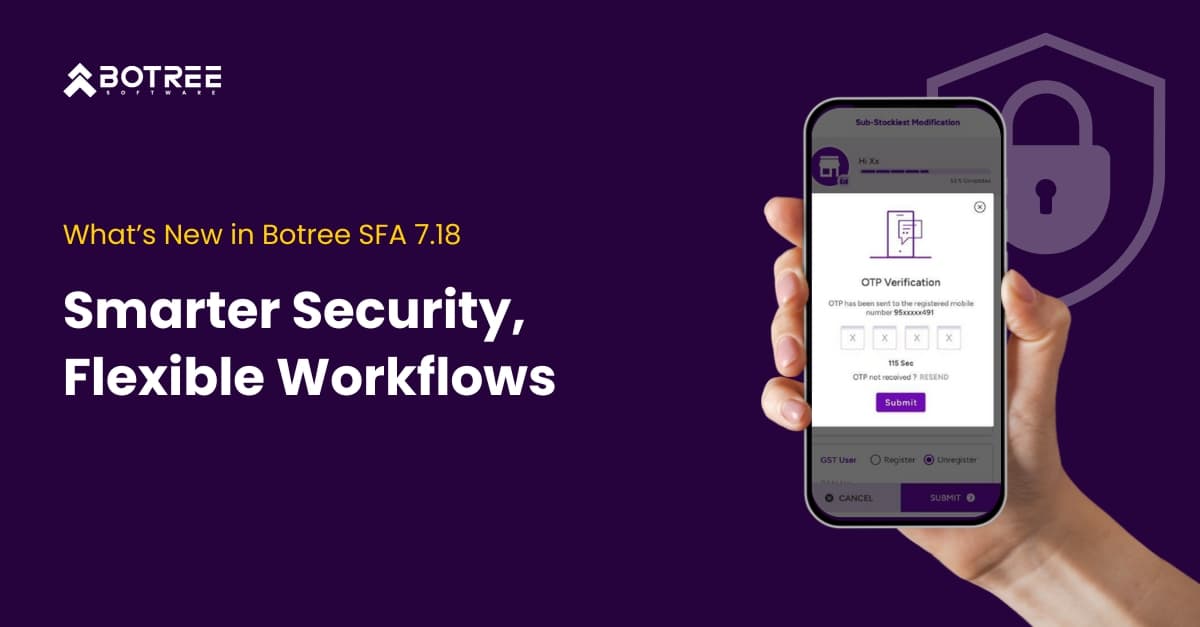
With this latest update, there’s now a strict validation step before OTPs are even sent out. Whenever someone enters a mobile number—whether they’re creating a new outlet or editing a sub-stockist—the system checks to see if that number is already tied to an active account. If it is, the user gets an instant popup showing where that number is already in use, and the process stops right there. No OTP is sent. No duplicate is created. Problem avoided.
One of your salesperson is registering a new outlet. They plug in a number and get an alert: that number’s already linked elsewhere. One tap saved them from hours of cleanup later.
Login processes have typically relied on a single layer of security, often just a password. While convenient, this presents risks. Lost phones, shared passwords, or force login attempts can compromise sensitive data, especially in large-scale field operations with many users accessing customer data daily.
The Solution: To address two-factor authentication (2FA) system has been built to protects all logins. Users must enter a time-sensitive OTP (One-Time Password) sent to their email or mobile number. This way, even if login credentials are stolen, unauthorized access is still blocked.
An on-site salesperson was preparing to register a pharmacy using a recycled mobile number. The app detected it immediately, preventing a possible instance of duplicate routing.
Let’s consider a typical situation. A business introduces a new product with enormous potential and high profit margins. The product team creates a PDF and may post a video to WhatsApp. While some salespeople look at it, others do not. Some are briefed over the phone. However, there is hesitancy when it comes time to sell. The representatives are unclear of the specifics, and the messaging is erratic.
The Solution: We built a training module directly into SFA—so content delivery, learning, and feedback all live in one place. Admins can assign training to the right users, track completion, and even validate understanding through quizzes.
A new SKU goes live. Alongside the launch, a quick training video explains features and ideal shelf placement. Field reps watch it during their day, answer a few follow-up questions, and managers instantly see who’s on track and who needs support. No chasing, no blind spots. Just clarity.
Not every process fits neatly into a template. Whether it’s collecting KYC details, doing an in-store audit, or gathering documents for compliance checks—teams often end up improvising. Google Forms. Paper logs. Even verbal updates. It works, sort of… but it’s messy. It slows things down, creates reporting gaps, and makes it hard to track what’s happening on the ground.
The solution: With the new Custom Form Builder, you can now create detailed, purpose-built forms directly inside the DMS—fully integrated with SFA. Admins get the tools to design exactly what’s needed, from required fields and conditional rules to submission logic that fits real-world scenarios.
A salesperson walks into a new outlet that’s flagged as “Pharma.” Instantly, the system pulls up a KYC form asking for a PAN number and a Drug License upload. The rep submits it on the spot. The documents are stored in DMS, flagged for review in RNA, and available instantly for compliance audits.
There’s always that moment—after a field visit—when someone realizes they missed something. Maybe it’s a wrong entry, maybe a SKU was forgotten, or maybe a last-minute update didn’t get captured. But with the old activity trackers, there was no going back. Once submitted, the form was locked. No edits, no do-overs. It created unnecessary friction, and worse, left gaps in data and visibility.
Now, that’s changed.
The tracker system has been upgraded to support multiple submissions for the same activity. Each submission is logged separately and clearly marked with a sequence number. That means updates are allowed—but the original data still stays intact, so there’s a full record of what changed and when.
A merchandiser finishes their daily tracker but forgets to log one SKU. Later, they realize the error, open the tracker again, and submit an updated version. Both the original and the corrected entries are stored—complete with timestamps—giving managers a clean, transparent view of the change.
SFA 7.18 is more than just an update; it’s a response to real user feedback turned into practical improvements. By focusing on security, usability, flexibility, and readiness for the field, we’ve worked to remove unnecessary complexity and help your teams perform better and faster.
From validating mobile numbers to improving training workflows, each feature represents a step toward a more modern and resilient field operations system. These are not just enhancements; they are enablers.
And this is just the start. As field demands change, so will we. We will continually strive to help you stay ahead of operational and technological challenges.

Marketing Associate
Meet Christina Evangelin Ebinezer, our dynamic marketing associate at Botree Software. With a background in HR and marketing, and prior experience as a content writer, Christina brings a sharp eye for storytelling and a knack for crafting engaging blogs and marketing content. She’s passionate about turning ideas into words that drive impact. Outside of work, Christina finds joy behind the piano keys or the wheel—whether she’s playing a soulful tune or cruising down open roads.


Stay updated with the latest trends and insights.